
The Top 7 Reasons for Google Business Profile Suspension (And How to Avoid Them)
Critical Alert: Google Business Profile Suspension
A Google Business Profile suspension can instantly make your business disappear from Maps and local search, halting customer orders and severely impacting your online visibility.
Whether you own one shop or run multiple locations, knowing the GMB suspension reasons is key to following the rules and dodging costly breaks. In this article, we'll look at the main causes of Google Business Profile suspension, help you figure out "Why is my Google Business Profile suspended?", and give you practical ways to get your Google Business Profile back. Want to check if your profile is at risk? Run a free GMB audit to identify potential compliance issues before Google does.
Types of Google Business Profile Suspension
Soft Suspension
If you have a soft suspension, your profile will still show up on Google Maps, but you won't be able to change or manage it. It can become a hard suspension if it isn't fixed right away. There may still be new reviews posted, but they won't be visible to the public, which will mean fewer new reviews over time.
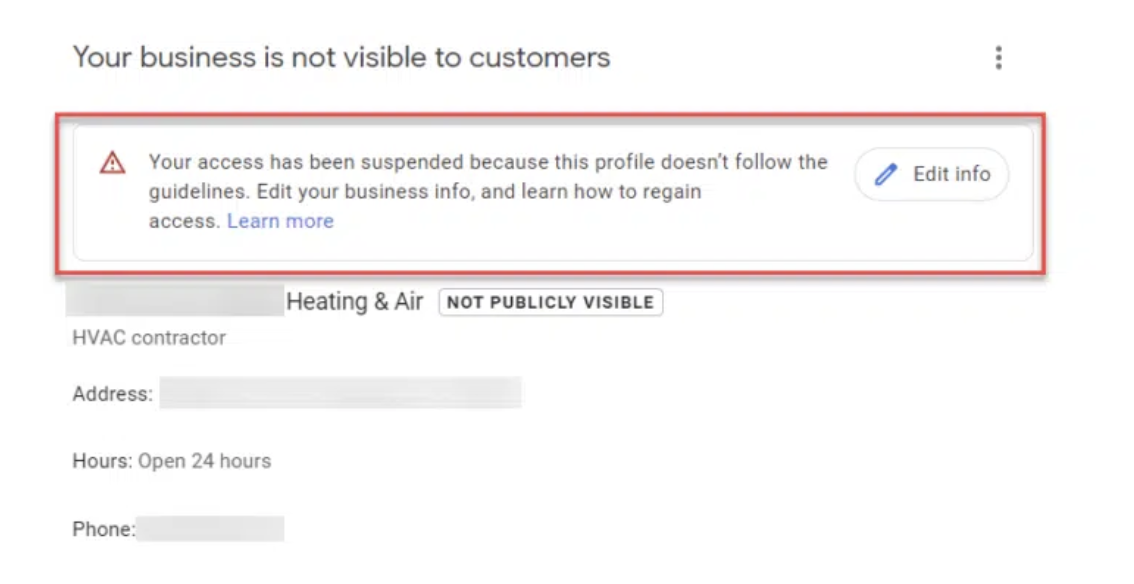
Example of a soft suspension warning
Hard Suspension
This is a bigger deal. Google Maps and search results will no longer show your entire business listing. This is the most common kind of suspension, and it's often harder to fix. The most annoying part is that Google doesn't usually tell you why, which makes it even harder to fix.
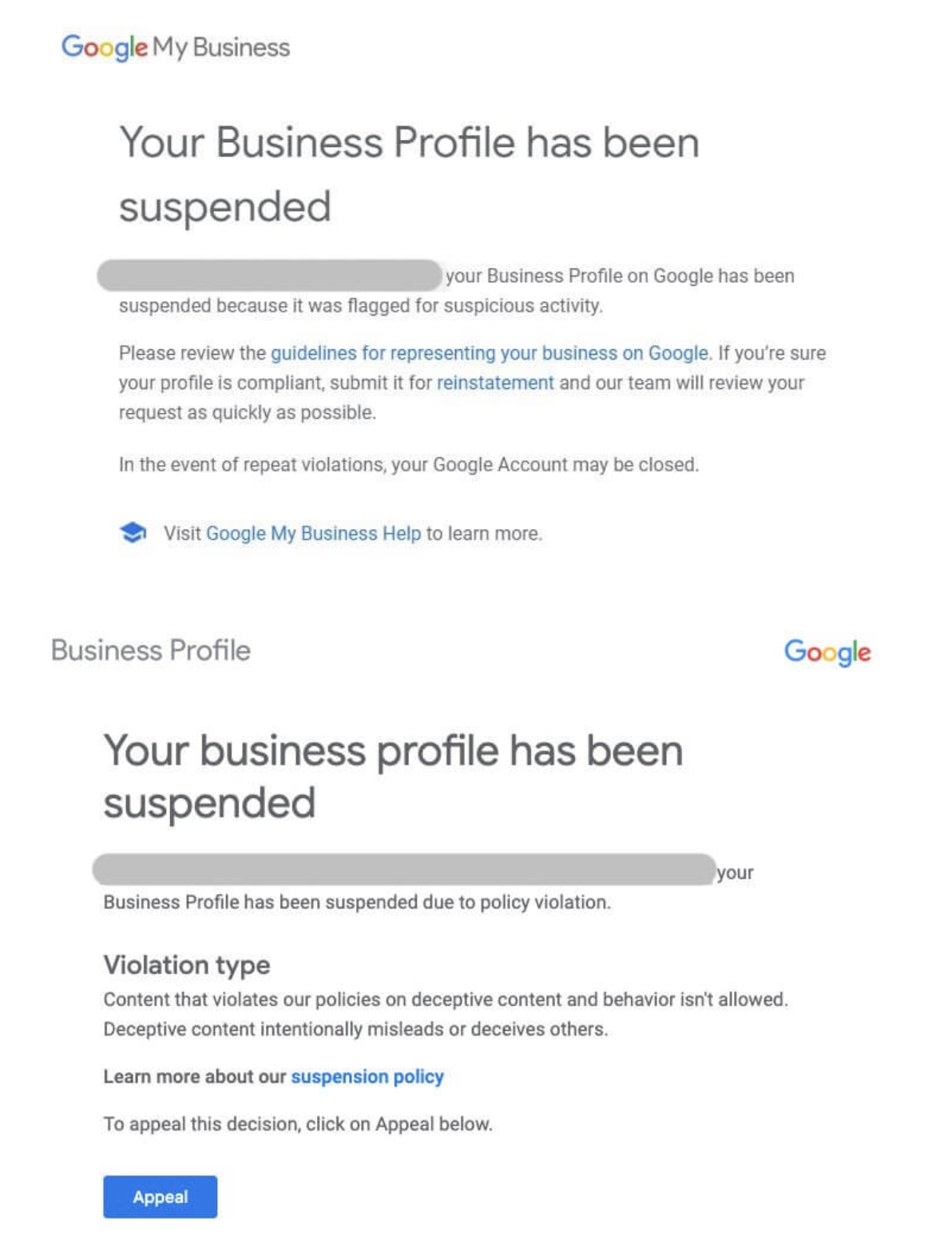
Example of a hard suspension notification
What are the top 7 Reasons for Google Business Profile Suspended
1Changing Too Much Profile Info at Once
Updating lots of details about your business like business name, address or categories all together might set off Google's spam alarm. This automatic flag often leads to a Google My Business suspension even when the changes are real.
How to avoid it:
Implement changes step by step. Once you've updated your Google Business Profile, hold off on making more edits for at least 5-7 days. This helps build trust and lowers the chances of Google's system flagging your account for suspension.
2Multiple Listings for One Location
Setting up several Google Business Profiles for a single address or service area can lead to big mix-ups—and often results in Google suspending your GMB. Google might also merge or remove duplicates.
How to avoid it:
Check your listings often to spot and get rid of duplicates. Make sure each profile stands for a unique physical spot or service area.
3Cramming Keywords into Business Name
Putting marketing phrases like "Best Pizza in Delhi" or "Affordable Spa Near Me" in your business name goes against Google's naming rules. These practices often get flagged and can lead to a Google Business Profile suspension.
Wrong: Best Pizza in Delhi - Joe's Pizzeria
Right: Joe's Pizzeria
How to avoid it:
Use your legal or storefront name without promotional words. Make sure your profile name matches what's on your signs and official papers.
4Wrong Business Categories
Picking categories that don't fit or mislead (like a clothing store listed as a pawn shop) makes it more likely your profile will get suspended. Google keeps a close eye on high-risk areas to catch misrepresentation.
Wrong: Food Court – Bean & Brew Café
Right: Café – Bean & Brew Café
How to avoid it:
Pick precise categories that match your main offerings or products. Check if the categories fit well when setting up or updating your profile.
5Messing with Reviews or Using Fake Feedback
Pushing for reviews, posting phony ratings, or showing odd spikes in reviews can lead to a Google My Business ban. Google runs tough checks and looks at things by hand to spot fishy stuff.
How to avoid it:
Ask real customers to leave honest reviews. Never buy reviews or give discounts for ratings. Keep an eye on your review patterns to spot anything weird.
6Logging in from Banned or Blocked Google Accounts
When your business profile is managed by an agency or employee using a Google account that's been suspended or flagged, it can have an impact on your profile too, leading to a Google Business Profile suspension.
How to avoid it:
Check who has access to your business profile. Right away, remove access for suspended inactive, or suspicious accounts to keep your profile's integrity.
7Using Shared or Virtual Addresses Instead of a Physical Location
One of the main reasons for Google Business Profile suspension is using shared workspaces, mail-receiving services, or post office boxes as your business address. Google allows physical locations with staff—if your business says it welcomes walk-in customers.
How to avoid it:
Just list real, staffed physical locations. Make sure your address has permanent signs and stays open during business hours.
What to Do If Your Google Business Profile Is Suspended
Still wondering, "Why is my Google Business Profile suspended?" Here's how to deal with it:
A. Stop Suspension Before It Happens
- • Keep your business details up to date
- • Only list physical addresses with on-site staff
- • Make slow changes to avoid setting off spam alerts
- • Use the correct business name and category
B. Get Your Google Business Profile Back After It's Taken Down
- • Gather needed documents like business permits, utility bills, rental contracts, and shop front pictures
- • Submit the full appeal form to Google with all your proof
- • Keep an eye on your appeal and follow up if you need to
C. Keep Following Rules and Watching
Set reminders to:
- • Check your profile regularly
- • Watch out for odd changes
- • Look at your email for warnings and ensure people you trust can update your profile
- • Keep track of reviews to spot fake or harmful ones
Conclusion
A Google My Business suspension doesn't happen by chance, it has an impact on guideline breaches, wrong details, or strange activity. Whether it's a misleading group fake feedback, or shared location use, you can prevent most Google My Business suspensions.
By grasping the main GMB suspension reasons and handling your listing, you can steer clear of issues and keep a robust local search presence. If your profile gets suspended, a clear reinstatement plan can help you get your Google Business Profile back fast and in line with rules.
Stay proactive with your profile health. Use our free GMB Audit Tool to regularly check for compliance issues and keep your business visible on Google.